
Cost Centres
Overview
- Cost Centres calculate production Hourly Rates using Overheads, Equipment, Labour, Maintenance Costs and Productivity of the Cost Centre.
- Cost Centre statuses can be Pending, Active or Cancelled. Although all the Cost Centres appear in lookups, only Active Cost Centres (black) can be selected. Warnings appear in the Items and Pricing modules to identify Cancelled Cost Centres.
- Overheads, from Active Cost Centres, are automatically apportioned according to the total cost of the Cost Centre. This allocation can be overridden.
- The assigned costs can be captured by week, month or year. These costs are converted to a monthly cost and then to an hourly rate based on productivity: hours worked per week and productive weeks per annum.
- The Hourly rate can be manually set by checking the Fix checkbox next to it.
User Settings
The defaults are the values for new databases, new users and new Transaction Types. Your database may have different values.
| Setting | Description | Default |
|---|---|---|
| Setups > Cost Centres - Access Allowed | Checkbox. If checked, access is allowed. | Unchecked |
Best Practices and Usage Guidelines
- Base initial Hourly Rates on an ideal productivity scenario, considering sufficient sales volume. Avoid setting the productivity too low, as this might price your services out of the market.
- BOS Enterprise tracks the usage of Cost Centres over time, allowing organisations to validate initial assumptions and adjust productivity settings as necessary (see Recovery below).
- Periodically review and update Cost Centre calculations to reflect changes in costs and productivity.
- Compare Cost Centres' performance against industry benchmarks to identify areas for improvement.
Statuses Explained
| Status | Description |
|---|---|
| Pending | The Cost Centre is not included when hourly rates are recalculated. |
| Active | The Cost Centre is included when hourly rates are recalculated. |
| Cancelled | The Cost Centre is not included when hourly rates are recalculated. |
List View
Buttons Explained
| Button | Description |
|---|---|
| View | Refreshes the display. |
| New | Creates a Cost Centre. |
| Menu |
|
Fields Explained
| Field | Description |
|---|---|
| ID | The system-generated number allocated to the Cost Centre. |
| Status | The Cost Centre's status. |
| Name | The Cost Centre's name. |
| Code | The Cost Centre's shortened name. |
| Type | The type of Cost Centre. |
| H | The number of productive hours in a week. |
| W | The number of productive weeks in a year. |
| OH% | The percentage of overheads allocated to the Cost Centre. |
| Fix | A checkbox. If checked, the overhead contribution is fixed. |
| Overhead | The value of overheads allocated to the Cost Centre. |
| Equipment | The equipment costs incurred by the Cost Centre. |
| Labour | The labour costs incurred by the Cost Centre. |
| Maintenance | The maintenance costs incurred by the Cost Centre. |
| Other | Any other costs incurred by the Cost Centre. |
| Total | The total costs incurred by the Cost Centre (all the previous costs added together). |
| Cost/hr | The hourly costs (Total divided by Hours). |
| Adjust/hr | The adjustment added to the hourly rate. |
| Rate/hr | The rounded rate per hour. |
| Fix | A checkbox. If checked, the hourly rate can be edited or manually entered. |
| Updated | The date on which the Cost Centre was last updated. |
| Updated by | The user who last updated the Cost Centre. |
| Menu (...) | A submenu with the following options:
|
Edit View
Direct Overhead Allocation
If services make up the bulk of turnover, add overheads (such as rent, electricity and admin salaries) directly to the Hourly Rate calculation. BOS can proportionally allocate overhead amounts to production Cost Centres based on their monthly costs.
Indirect Overhead Allocation
For businesses where outsourced work/products or material costs are substantial, it is advisable to recover overheads through an additional markup on all products, not just services.
The last date and name of the user who updated the record appear in the footer.
Buttons
| Button | Description |
|---|---|
| New | Creates a Cost Centre. |
| Delete | Deletes the Cost Centre. |
| Save | Saves any changes. |
| Actions |
|
Header
| Field | Description |
|---|---|
| Name | Enter the Cost Centre's name. |
| Code | The shortened name for the Cost Centre which is limited to ten characters. The Code is used in forms where space is limited. |
| Type | Select a Type from this dropdown list:
|
| Entity | If there is more than one entity, Cost Centres can be linked to an entity. Overheads are apportioned to other Cost Centres that belong to the same entity. |
| Hours/Week |
|
| Weeks/Annum | The number of weeks in a year (52) with unproductive time deducted (e.g. public holidays and annual shutdown periods). |
Workstations
- Workstations are used for production planning and tracking.
- An unlimited number of workstations can be added. (Click Add Workstation (button)).
- One workstation must be selected as the default.
- From the Production Board, services are assigned to the applicable Cost Centre's default workstation.
- A different workstation can be selected in the Tracker App.
Costs
Costs can be added manually (click Add Cost (button)) or by using the Cost Wizard (click Wizard (button)).
Wizard
- Equipment: Enter the Market Value of the equipment, a market-related Term and Interest Rate. Enter these fields even if the equipment is paid for to account for replacement costs.
- Operators:
- Operators: Add the wages and number of operators.
- Assistants: Add the wages and number of assistants.
- Frequency: Check Weekly, Monthly or Annually that matches the entered rate.
- Tip: Add the annual wages inclusive of bonuses, benefits and regularly worked overtime to calculate an accurate rate.
- Maintenance: Enter the cost and select the frequency that matches the cost.
- Click Finish (button) to complete the process.
Fields
Fields marked in blue (✎) can be edited.
| Field | Description |
|---|---|
| Description | The cost's description. |
| Type |
|
| Weekly/Monthly/Annual | Allows costs to be captured for different periods. These are not calculation fields; all the entered costs are added and become the Direct Costs. |
| Total/month | All the costs converted to a monthly total. |
Totals
| Field | Description |
|---|---|
| Overheads |
|
| Monthly Cost | Calculated from Direct Costs and Overheads. |
| Hourly Cost | Calculated from Monthly Cost and Productivity (Hours/Week & Weeks / Annum). |
| Adjustment | Can be used to adjust the Hourly Rate (e.g. add a markup amount). |
| Hourly Rate | The calculated hourly rate which is used for Estimating. |
| Fix | When checked, the hourly rate can be manually entered. |
Recovery
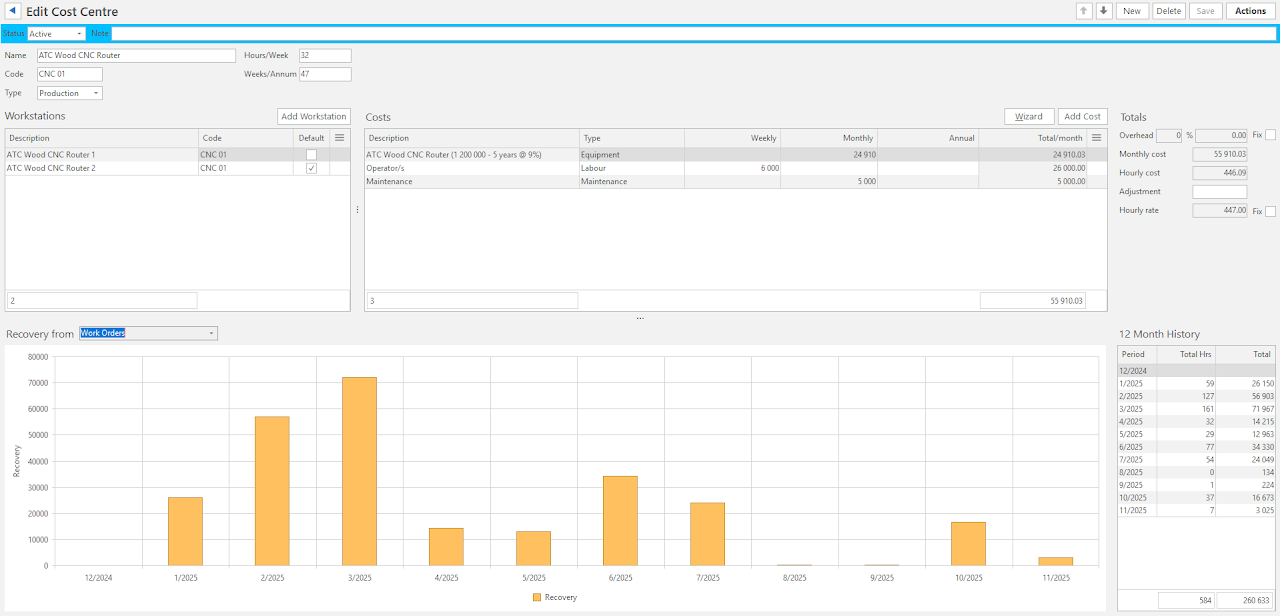
- Provides a dropdown list to show costs recovered from: Costings, Work Orders or Quotations.
- The graph and summary display the actual productivity and usage which can be used to update the costs. See example below: