Home Production Cost of Sales
Production
Cost of Sales
Overview#
This report lets you analyse the profitability of transactions at both the header and item levels and can operate on multiple tiers. For example, if a sales order is associated with multiple work orders, you can use this report to evaluate the profitability of each Work Order individually and the overall profitability of the Sales Order .
The following costs are measured:
Purchases Goods Issued (can also be used for non-inventory items)Goods Returned (can also be used for non-inventory items)Expenses that are linked to transactions in the Ledger .Services that are internal services (labour) from timekeeping.Settings#
Navigation Example Main Menu > Setup > Settings > General (tab)
Note The defaults are the values for new databases, new users and new Transaction Types. Your database may have different values.
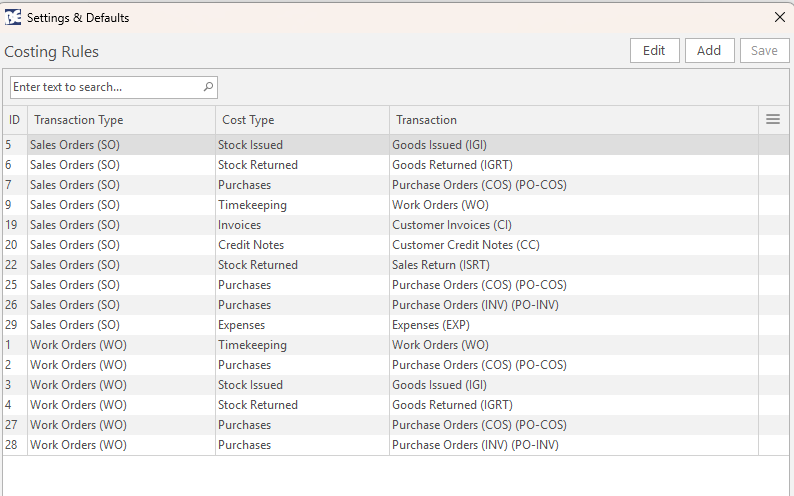
Setting Description Default Accounting > Setup Costing Rules Edit ( text) in the Value column opens a screen where Transaction Types (modules) are linked to Cost Types (see screenshot below).Not applicable Accounting > Filter - Accounts that update Cost of Sales (e.g. = 2, in (1,2,3)) Allows specific accounts to be included or excluded from Cost of Sales for the Detailed Ledger view. Blank
Costing Rules linking Transaction Types to Cost Types. Button Description View Generates a report based on the selected filters. Output Available if templates are added. Menu Reset Data Filter: Resets all the filters.Views: Switches to the selected view:Transactions Items Detailed Ledger Setup – Cost of Sales Actions Rebuild: Rebuilds the report if changes were made to the setups.Export Email Excel: Attaches the current display to an email.Export Grid: Creates a .xlsx file and lets you select a save location.Layout & Grids Save Save (All Users) Restore Default (All Users)
Filters Explained#
Filter Description Top row Search dropdown list to select SO (Sales Order) or WO (Work Order) and to type a number in the adjacent field. Second row Select:Trans Date for the transaction date.Invoice Date for the customer invoice date. Date: A dropdown list with various date options (e.g. Today, This Month).Date fields: Options to customise the date selection.Transaction: Select from a list of transactions in your Costing Setup (e.g. SO or WO).Status: A dropdown list of all the possible statuses to filter records accordingly.
Transactions View#
Navigation Example ... Cost of Sales > Menu (button) > Transactions
Displays a cost summary at a transaction level. All the Costs linked directly to the transactions or to cascading transactions appear. When Invoiced Date is selected, the Actual Invoiced and Variance between Order and Invoiced appear. Actual Costs that are linked at a Header or Item level appear in this view.Sections#
Field Chooser (*): Add or remove sections. The options are:Transaction: Displays information that is in the transaction header.Costs: Displays the costs associated with the transaction.Summary: A financial summary including the profit earned on the transaction.Transaction Fields#
Field Description Field Chooser (*) Add or remove fields (columns). ID The system-generated number allocated to the entry. Trans No. The transaction's code and number. Status The status of the transaction. Date The field includes the transaction code (e.g. SO Date or WO Date) and displays the transaction date. Invoiced Displays the invoice date. From The transaction that was copied to create the transaction. Entity The entity selected for the transaction. Customer The name of the customer. Cus Cat The customer's category. Job Cat The job's category. Rep The rep selected on the transaction. Reference The reference filled in on the transaction. FlowID The system-generated number allocated to the transaction flow.
Costs Fields#
Field Description Stock Issued The quantity of stock issued from Goods Issued transactions. Stock Returned The quantity of stock returned from Goods Returned transactions. Purchases The total value of purchases from Purchase Orders. Services The total value of labour from Timekeeping records. Expenses The expenses allocated to the transaction (see below).
Summary#
Field Description Total The transaction total. Invoiced Only displayed if the filter Invoice Date is selected. Displays the amount invoiced. Variance Only displayed if the filter Invoice Date is selected. Displays the difference between the transaction (e.g. Sales Order) and invoiced amount. Cost The total costs as reported in the costs' section. Profit The difference between the transaction total and costs which should be the profit earned on the transaction. GP% Gross Profit percentage: profit as a percentage of the transaction total (sales).MU% Markup percentage: profit as a percentage of the costs.
Field Description Open Transaction Opens the original transaction. Linked Transactions Displays a list of linked transactions. Item Summary Disabled in Transactions view. Stock Issued Displays a list of Goods Issued transactions. Only applies to entries with an amount in the Stock Issued column. Purchases Displays a list of Purchase Orders . Only applies to entries with an amount in the Purchases column.
Items View#
Navigation Example ... Cost of Sales > Menu (button) > Items
Displays the costs and profit earned at an Item Level. If the transaction uses Estimates , the Estimate items appear; otherwise transaction items appear. Actual Costs that are not linked to Items do not appear in this view.Sections#
Field Chooser (*): Add or remove sections. The options are:Transaction: Displays information that is in the transaction header.Item: Displays information about the item.Qty: Displays quantity information.Costs: Displays the costs associated with the transaction.Summary: A financial summary including the profit earned on the transaction.Transaction Fields#
Field Description Field Chooser (*) Add or remove fields (columns). ID The system-generated number allocated to the entry. Trans No. The transaction's code and number. FlowID The system-generated number allocated to the transaction flow. Status The status of the transaction. Date The field includes the transaction code (e.g. SO Date or WO Date) and displays the transaction date. From The source transaction. Entity The entity selected for the transaction. Customer The name of the customer. Cus Cat The customer's category. Job Cat The job's category. Reference The reference filled in on the transaction.
Item Fields#
Field Description MatunitID The system-generated number for the material's unit entry. ItemID The system-generated number for the item. Type The type of item (e.g. Est, Itm, Mat). Item No. The sequential number allocated to items on a transaction. Description The item's description. Code The item's code. Category The item's category. Subcategory The item's subcategory. Department The item's department. Provider The provider of outwork. Resolve The item's resolve on the transaction (e.g. Reserve, Produce). Adj% The adjustment percentage applicable to the item.
Qty Fields#
Field Description Estimated The quantity needed as per the estimate. Actual The actual quantity used. Variance The difference between the Estimated and Actual quantities. Where more items were used (actual exceeds estimate) the variance appears in red.
Costs Fields#
Info The settings (see above) determine which specific transactions are included.
Field Description Stock Issued The quantity of stock issued from Goods Issued transactions. Stock Returned The quantity of stock returned from Goods Returned transactions. Purchases The total value of purchases from Purchase Orders. Services The total value of labour from Timekeeping records.
Summary#
Field Description Total The transaction total. Invoiced Only displayed if the filter Invoice Date is selected. Displays the amount invoiced. Variance Only displayed if the filter Invoice Date is selected. Displays the difference between the transaction (e.g. Sales Order) and invoiced amount. Cost The total costs as reported in the costs' section. Profit The difference between the transaction total and costs which should be the profit earned on the transaction. GP% Gross Profit percentage: profit as a percentage of the transaction total (sales).MU% Markup percentage: profit as a percentage of the costs.
Field Description Open Transaction Opens the original transaction. Linked Transactions Displays a list of linked transactions. Item Summary Displays the item's summary. Stock Issued Displays a list of Goods Issued transactions. Only applies to entries with an amount in the Stock Issued column. Purchases Displays a list of Purchase Orders . Only applies to entries with an amount in the Purchases column.
Allocating Expenses#
Expenses can be assigned to specific projects (transactions) using the Allocate Expense menu item, accessed by right-clicking an expense item in the ledger. This allocation can only be done using the local currency. The following columns can be added to the Ledger Items View to provide an indication of the allocated Expenses: Expense Allocation: Lists the transactions to which the expense was allocated.Allocated Total: The total amount that was allocated.Note: These fields are highlighted in red when the Allocation does not match the item total. See Landing Costs for detailed instructions on how to allocate these expenses.
Learn More